

When organizations adopt Appian, the initial excitement usually revolves around speed: how quickly a business process can be digitized, how intuitive the SAIL interfaces look, and how seamlessly Data Fabric connects disparate tables.
In the early stages of a project, it is tempting to treat Appian as a self-contained universe. After all, it has a database, a document repository, an integration engine, user management, and an execution environment. Why look anywhere else?
However, if you have been building enterprise-grade solutions for any length of time, you know the harsh reality: Appian was never meant to be a standalone monolith.
Appian is at its best when it serves as the intelligent orchestration and experience layer—the brain and face of your business processes. When we force it to act as an Enterprise Service Bus (ESB), a Big Data warehouse, or a bulk file repository, performance degrades, operational risks skyrocket, and maintainability suffers.
In this post, let’s look at the essential architectural “satellites” that belong in a mature enterprise ecosystem around Appian—and where to draw the line between what stays inside the platform and what belongs outside.
Let’s talk Enterprise Architecture Around Appian!
Storage & Heavy File Offloading: S3 and Blob Storage
Appian includes native document management capabilities that work wonderfully for day-to-day workflow documents—like an active approval form, an invoice preview, or small attachments.
However, a classic architectural pain point occurs when Appian needs to provide access to massive files: large CAD drawings, multi-gigabyte ZIP archives, audio recordings from customer service, or historical case files. If Appian has to fetch these huge files from storage and stream them through its own application server to the user’s browser, it consumes valuable server memory (heap) and saturates servlet threads.

The Architectural Pattern: Direct-to-Client Download via Presigned URLs
Instead of forcing Appian to act as a heavy file proxy:
- When a user opens a dashboard or clicks to view a document, Appian calls the object store (e.g., AWS S3 or Azure Blob) via an integration to generate a time-limited Presigned Download URL.
- Appian renders this URL in SAIL using a simple
a!safeLink()or document viewer. - The user’s browser streams the file directly from the S3 bucket.
Appian only ever manages the lightweight metadata (file key, MIME type, permissions, creation date), keeping your Appian application server lean and responsive regardless of how large the actual files are.
The Integration Layer: API Gateways vs. The “Quick Java Plugin” Reflex
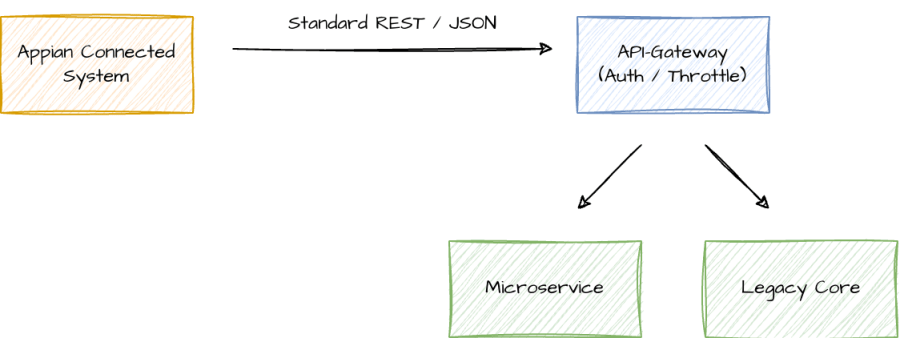
Every enterprise application needs to talk to external backends. In Appian, creating an integration or connected system is straightforward. But as soon as you connect to dozens of internal micro-services, core banking engines, or legacy ERPs, you need an API Gateway (e.g., Kong, Apigee, AWS API Gateway, Azure APIM).
An API Gateway provides critical cross-cutting concerns that you do not want to manage inside your process models:
- Rate Limiting & Throttling: Preventing an automated batch process in Appian from unintentionally hammering a fragile legacy backend.
- Centralized Security: Enforcing mTLS, Web Application Firewalls (WAF), IP whitelisting, and OAuth2 token mediation.
- Enterprise Observability: Distributing trace IDs (OpenTelemetry/W3C) across the network to track a request from Appian all the way to the core database.
“Why an API Gateway if we can just write a Java Plugin?”
This is a question I hear frequently: “Why wait for the gateway team or set up infrastructure when our Java developers can write a custom plugin in an afternoon?”
While Appian’s Plug-in SDK is a powerful tool, using custom Java code as a substitute for integration infrastructure is a dangerous shortcut:
- Blast Radius & Platform Stability: A Java plugin runs inside the Appian JVM. If a custom HTTP client leaks sockets, fails to configure strict connection timeouts, or mishandles memory, it doesn’t just break that single integration—it can bring down the entire Appian environment for all users.
- Hidden “Shadow Integrations”: When integration logic is compiled into JAR files, enterprise architecture teams lose all visibility into what is connecting where. You lose centralized logging, API cataloging, and automated security patching.
- Where Java Plugins Actually Belong: Use Java plugins to extend Appian’s internal compute capabilities—manipulating binary data (e.g., complex PDF manipulation, Apache POI operations), running proprietary cryptographic hashing, or creating reusable UI components. Leave network routing, policy enforcement, and protocol transformation to dedicated network infrastructure.
Asynchronous Decoupling: Event Streaming & Message Brokers
Synchronous REST calls are fine for immediate user interactions (e.g., validating an address before a form is submitted). But when a process involves triggering batch calculations, sending notifications, or syncing downstream systems, synchronous HTTP calls create tight coupling and timeout risks.
Integrating a message broker or event streaming platform (like Apache Kafka, RabbitMQ, or AWS SQS) fundamentally improves platform resilience:
- Fire-and-Forget Architecture: When a case in Appian reaches a milestone, Appian emits an event to the broker and immediately moves on. Downstream systems consume the event at their own pace.
- Resilience Against Outages: If the downstream CRM is down for maintenance, the event sits safely in the queue. Appian processes don’t stall with red error alerts in the process monitoring tab.
- Inbound Webhooks over Polling: Instead of scheduling an Appian process model to poll a database every 5 minutes looking for changes, have the source system publish an event that triggers an Appian Web API.
The Data Tier: Operational Data vs. Data Warehousing
With Appian’s Data Fabric and Synced Records, querying and relating data across multiple sources has become remarkably easy. But we must be careful not to confuse an operational process cache with an enterprise reporting engine.
| Dimension | Appian Data Fabric / Operational DB | Enterprise DWH / Lake (Snowflake, BigQuery) |
|---|---|---|
| Primary Workload | OLTP: Fast, transactional, single-record reads & updates for active cases. | OLAP: Heavy aggregations, multi-year historical trends, full table scans. |
| Data Retention | Active and recently completed cases (months to a few years). | Entire organizational history (10+ years). |
| Query Pattern |
Low latency, targeted indexes (WHERE id = ?).
|
Complex analytical queries across millions of rows. |
If business stakeholders want dashboards showing 10-year rolling averages across 50 million historical rows, do not build that in an Appian interface.
Instead, establish a clean Change Data Capture (CDC) or scheduled ETL pipeline from your operational databases into a Data Warehouse (Snowflake, BigQuery, Databricks), and embed dedicated BI visualizations (like Power BI or Tableau) inside Appian when needed. Keep Appian focused on the live, actionable data required to complete the task at hand.
Identity, Access, and Secrets Management
In an enterprise environment, Appian cannot manage its users in a silo:
- Identity Providers (IdP): SAML 2.0 / OIDC integrations with Microsoft Entra ID (Azure AD), Okta, or Ping Identity ensure seamless Single Sign-On (SSO).
- Automated User Lifecycle (SCIM): User onboarding, role changes, and deactivations should happen automatically via SCIM or directory sync—never through manual user administration in the Appian Admin Console.
- External Secrets Management: While Appian provides secure credentials storage for Connected Systems, enterprise architectures frequently leverage central vaults (HashiCorp Vault, AWS Secrets Manager, Azure Key Vault) to rotate API keys, database passwords, and client certificates without requiring application redeployments.
The Golden Rules for Enterprise Appian Architecture
To wrap this up, here are four guiding principles to keep in mind when designing the architecture around your Appian platform:
- Orchestrate, Don’t Replicate: Appian is the orchestrator of processes and data. If a specialized enterprise tool already does something well (archiving, rate limiting, big data analytics), delegate to it.
- Protect the JVM: Avoid writing custom Java plugins for tasks that belong in an API Gateway or iPaaS. Keep your plugins focused on local data computation.
- Decouple via Events: Replace synchronous point-to-point chains with asynchronous event streams (Kafka/SQS) for non-blocking operations.
- Offload the Heavy Lifting: Stream large binary files directly from object storage (S3) via Presigned URLs and delegate historical analytics to the DWH. Keep Appian’s memory and database lean for transactional execution.
Over to You
How does your current Appian landscape look? Are you using Presigned URLs for file distribution, or is your team still having the classic debate of building integrations in Java vs. an API Gateway?
Rock your architecture!
I’d love to hear your thoughts and war stories in the comments below!